






Blogs
Explore insights, tips, and industry trends

Case studies
See how organizations achieve real results

eBooks and reports
Access in-depth research and expert analysis

Research
Discover original research and data-driven insights

Webinars
Join live and on-demand sessions with experts

Whitepapers
Access research and expert analysis

Academy
Build skills with structured courses and training

Certified trainers
Get expert training from certified professionals

International partners
Connect with trusted partners around the world

Knowledge center
Find guides, tutorials, and product documentation




Transforming risk registers from static to dynamic

Key takeaways
Traditional, deterministic risk registers built solely in Excel struggle to reflect the uncertainty and interdependencies of modern projects. By integrating @RISK, risk registers evolve into dynamic, simulation-driven decision tools that quantify uncertainty, improve forecast realism, enhance risk visibility, and provide decision-makers with a statistically defensible basis for risk prioritization and action.
What do your organization’s risk registers really look like in practice? For many teams, risk data is scattered across disconnected Excel files, project schedules, and ad hoc reports—owned by different people, updated at different times, and rarely aligned. By the time risks are reviewed, the data behind them is often outdated, incomplete, or already overtaken by events.
This fragmentation leads to a familiar problem: risk registers that document uncertainty but fail to actively inform decisions. When data is dispersed across silos and updates depend on manual effort, risk management becomes reactive—centered on maintaining spreadsheets rather than understanding how risks propagate, interact, and evolve across projects and portfolios.
In a recent session from Lumivero’s Decoding Decisions webinar series, Manuel Carmona, Risk and Decision Analysis Specialist at EdyTraining, Ltd., explored how organizations can move beyond static, disconnected risk registers toward predictive, decision-ready systems using Lumivero risk and decision software.
This article examines how combining Excel with @RISK and the Predict! transforms risk registers into dynamic, continuously updated tools that connect data, surface insight, and support confident decision-making at scale. For organizations looking to take this a step further, SharpCloud can bring these insights together in an interactive decision environment—connecting risks, projects, and assumptions in one shared visual model so leaders can explore trade-offs and make decisions with full context.
What risk registers are—and why they matter
Risk registers are a foundational instrument of project and enterprise risk management. At their core, they provide a structured and transparent representation of uncertainty, capturing not only what might go wrong, but why, how, and with what consequences. A well-constructed risk register typically documents:
- Risk categories and sources of uncertainty
- Root causes and triggering conditions
- Potential impacts on cost, schedule, scope, quality, or safety
- Planned mitigation, response, and ownership strategies
Beyond simple documentation, risk registers play a critical role in shaping how organizations perceive, discuss, and act upon uncertainty. When designed and maintained effectively, risk registers matter because they:
- Enable shared understanding and accountability by providing a common reference point for project teams, managers, and executives
- Support prioritization and resource allocation, ensuring attention is directed toward risks that materially threaten objectives rather than those that are merely visible or easy to list
- Enhance situational awareness, allowing decision-makers to understand how the project’s risk profile evolves over time
- Strengthen decision confidence by making assumptions, exposures, and response strategies explicit and traceable
In short, a risk register is not merely an administrative artefact, they're an essential risk planning best practice. It is a management tool that, when used properly, connects uncertainty to action and transforms risk awareness into informed decision-making. When risk registers evolve beyond static lists and become living documents, they can better reflect how uncertainty changes and propagates over the project lifecycle—enabling smarter, more timely decisions.
Why Excel-only risk registers fall short
Excel remains a popular choice for risk register management. It's familiar, flexible, and widely accessible. On its own, however, Excel has limitations that can undermine your risk management efforts, including:
- Single-point estimates dominate
Deterministic values hide variability and mask the true range of possible outcomes. - Ordinal scoring oversimplifies risk
Qualitative scales compress very different exposures into the same category. - Uncertainty is not explicitly modeled
Likelihood and impact are recorded, but their probability distributions are ignored. - Interdependencies are difficult to capture
Correlations and compound effects across risks are rarely analyzed rigorously. - No visibility of tail risk
Extreme but still plausible outcomes remain invisible in deterministic registers. - Limited support for decision-making
Risks are documented, but mitigation strategies cannot be quantitatively tested. - Focus shifts to maintenance and compliance, not insight
Effort is spent updating spreadsheets rather than understanding evolving exposure.
However, integrating Excel with risk assessment software and a centralized risk database enables probabilistic modeling and a centralized system of record. What was once a static spreadsheet becomes a modern decision engine: dynamic, scalable, probabilistic, and capable of continuously recalculating the impact of risks on project objectives.
From risk register to decision engine with @RISK and Predict!
With the right structure, simulation capabilities, and automation, risk registers can transform into intelligent systems that test thousands of scenarios, forecast outcomes, and visualize risk impacts in near real time.
By layering Lumivero’s Predict! with @RISK risk analysis software, your teams can access continuous feedback about risk status that supports adaptive, data-driven decision-making across projects and portfolios.
@RISK: An Excel add-on for robust risk analysis
@RISK is a Monte Carlo simulation add-in that runs within Microsoft Excel. It enables users to define uncertainty using statistical distributions and run thousands of simulations to understand a full range of possible outcomes.
@RISK contains dozens of different pre-set distributions you can use, or you can define your own as recommended by a subject-matter expert.
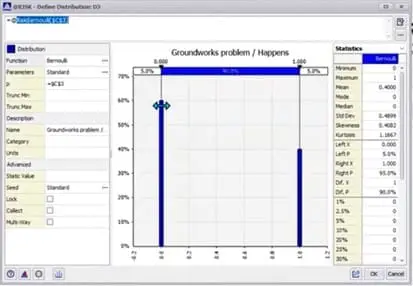
Choosing a pre-set statistical distribution in @RISK
With @RISK, teams can:
- Determine an estimated range for project costs or time, rather than single-point estimates
- Test the effectiveness of alternative risk mitigation strategies. Testing alternative scenarios is most useful when teams understand the different risk response techniques available and what each response is designed to achieve.
- Quantify the impact of risks on project goals and prioritize accordingly
- Identify the most influential risk drivers through sensitivity analysis, indicating which variables matter most
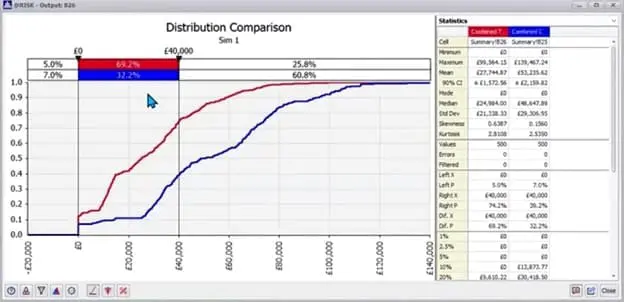
Example simulation output from @RISK, showing costs before (blue) and after (red) mitigation strategies are applied.
Compared to Excel alone, @RISK dramatically expands analytical depth. But its impact grows even further when paired with Predict!.
Predict!: Centralized risk governance and visibility
Predict! provides a structured, centralized risk database that connects qualitative and quantitative risk data across the enterprise. When integrated with @RISK, it enables a self-updating risk management system.
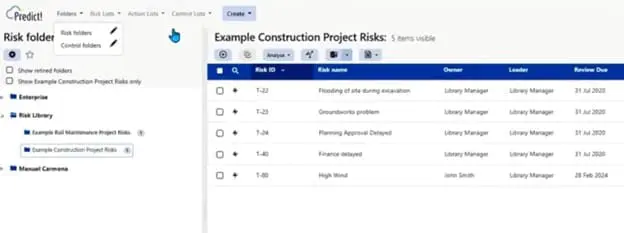
The Predict! dashboard, showing project folders and individual risks within those folders.
With Predict!, organizations can:
- Centralize risk registers across projects and portfolios
- Assign risk owners and schedule reviews
- Visualize dependencies and correlations across cost, schedule, and technical risks
- Generate boardroom-ready outputs such as confidence curves, tornado charts, and bow-tie diagrams
Predict! also integrates well with scheduling tools like Primavera and MS Project, making it the ideal central hub for enterprise risk governance.
How @RISK and Predict! work together
Connecting @RISK and Predict! into a unified workflow follows a straightforward process:
- Build your risk register in Predict!, defining probabilities, impacts, and attributes
- Easily export risk data to @RISK for simulation in Excel
- Run Monte Carlo simulations using familiar @RISK distributions and workflows
- Re-import results into Predict!
- Refresh dashboards and reports automatically with the latest insights
This architecture deliberately avoids the limitations of monolithic or static risk tools. Predict! functions as the authoritative system of record, ensuring consistency, governance, and traceability of risk data. @RISK provides a dedicated simulation engine purpose-built for probabilistic analysis, while Excel remains the flexible and familiar analysis interface for modeling, exploration, and communication.
Working together, these three components separate data governance, analytical power, and user interaction—delivering a solution that is more flexible, scalable, auditable, and resilient than any single-platform alternative. The result is consistent, decision-ready risk insight that can be applied seamlessly across teams, projects, and portfolios without sacrificing transparency or analytical depth.
Bringing risk insights together with SharpCloud
As risk registers become more dynamic and simulation-driven, a new challenge often emerges: how to make sense of those insights across projects, portfolios, and strategic initiatives. Even with strong forecasting and centralized risk data, decisions can still stall when leaders can’t see how risks, assumptions, and actions connect.
This is where SharpCloud adds a critical layer.
SharpCloud is an interactive decision intelligence system that brings projects, risks, and controls into a single, visual environment—helping teams move decisions forward with full context. Rather than reviewing risk outputs in isolation, leaders can explore how changes cascade across initiatives, dependencies, and outcomes.
With SharpCloud, organizations can:
- Connect risk data into a living model
Bring insights from Predict! and @RISK together with projects, objectives, and controls in one shared system. - Make impact visible across the portfolio
See how changes in risk exposure, mitigation strategies, or assumptions influence delivery, timelines, and outcomes. - Support exploration and alignment
Enable teams and executives to explore scenarios, understand trade-offs, and align on decisions—before committing resources. - Communicate decisions clearly
Translate complex risk analysis into intuitive visuals that support discussion, confidence, and action at every level.
By combining predictive risk analysis with an interactive decision environment, organizations can move beyond reporting risk to actively managing it—ensuring decisions are informed not just by probabilities, but by context. SharpCloud helps transform risk insights into shared understanding, enabling confident progress as complexity scales.
Start building your dynamic risk decision engine
Static risk registers can’t keep pace with modern uncertainty. By integrating @RISK and Predict!, you can transform Excel-based registers into dynamic, simulation-driven systems that improve forecasting and visibility—as well as confidence in every decision.
To bring those insights together and support decisions with full context, SharpCloud adds an interactive decision environment that connects risks, projects, and assumptions across portfolios—helping teams explore trade-offs and move forward with clarity.
Request a demo of Lumivero’s decision solutions to see how @RISK, Predict!, and SharpCloud work together to support modern, connected risk management.




How can we help you? Contact us.