






Blogs
Explore insights, tips, and industry trends

Case studies
See how organizations achieve real results

eBooks and reports
Access in-depth research and expert analysis

Research
Discover original research and data-driven insights

Webinars
Join live and on-demand sessions with experts

Whitepapers
Access research and expert analysis

Academy
Build skills with structured courses and training

Certified trainers
Get expert training from certified professionals

International partners
Connect with trusted partners around the world

Knowledge center
Find guides, tutorials, and product documentation




How to use AI with Monte Carlo simulation: Practical guide for risk teams

Key takeaways
This article explores how risk analysts and decision-makers can use large language models (LLMs)—including ChatGPT, Microsoft Copilot, and Anthropic's Claude—alongside Monte Carlo simulation tools like @RISK to build stronger probabilistic risk models. Combining AI with @RISK in Microsoft Excel can help teams surface overlooked risks, propose input distributions, and pressure-test assumptions faster than manual methods alone.
However, LLM outputs require expert review—AI can and does make mistakes, so verification is always essential. The article also covers prompt engineering best practices, practical workflows across Lumivero's decision toolkit, and key ethical considerations for using AI responsibly in risk analysis.
New techniques for refining probabilistic risk modeling are always emerging—and right now, AI is leading the charge.
At the heart of quantitative risk analysis is Monte Carlo simulation: a computational method that uses repeated random sampling to model the range of possible outcomes in any process where uncertainty plays a role. It's the engine behind how analysts move from gut instinct to data-driven confidence. And increasingly, it's being paired with a new class of tools—large language models (LLMs) like ChatGPT, Microsoft Copilot, and Anthropic's Claude—to make that modeling process faster, sharper, and more accessible than ever.
In a Lumivero webinar, Manuel Carmona, Risk and Decision Analysis Specialist at EdyTraining Ltd, walked through practical strategies for using LLMs alongside Lumivero's quantitative risk analysis tools—@RISK, PrecisionTree, and RiskOptimizer—to complement and enhance how probabilistic models are built.
Continue reading for the highlights of the presentation or watch the webinar on-demand to gain a deeper understanding of how AI enhances risk modeling.
Monte Carlo simulations: A quick refresher
Risk analysis is foundational for any organization trying to anticipate and manage uncertainty—whether in operations, investments, or complex project delivery. At its core, it's the process of identifying, assessing, and prioritizing potential risks before they impact outcomes. And one of the most powerful techniques for doing that is Monte Carlo simulation.
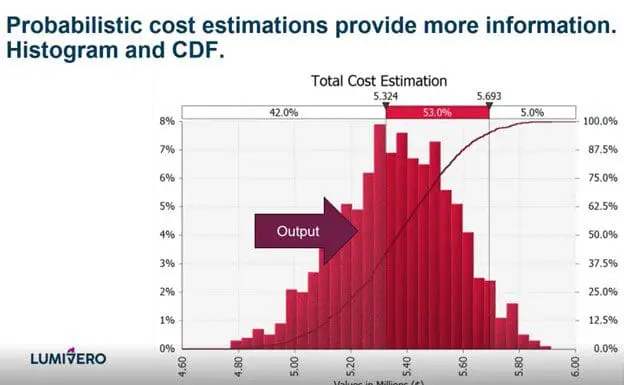
Monte Carlo simulation works by sampling statistical distributions repeatedly to generate a wide range of possible outcomes for a given scenario. By simulating thousands of scenarios, it gives decision-makers a realistic picture of how uncertainty and risk could affect budgets, timelines, and performance—not just a single best-guess forecast.
@RISK puts powerful Monte Carlo simulation tools right into Microsoft Excel, making it easy to assign input distributions and simulate thousands of scenarios for robust, decision-ready analysis. This allows you to model uncertainties in cost estimation as well as financial, operational, or project-related scenarios.
Now, AI is taking that further. Through prompt engineering, LLMs can act as a sounding board during model development—helping analysts surface overlooked risks, propose initial probability ranges, and suggest plausible distributions with rationale. When paired with Monte Carlo tools like @RISK, AI doesn't replace the analyst or the model—it accelerates the thinking around it. That said, as with any tool, outputs need to be verified: LLMs can and do get things wrong, which makes expert review an essential part of the workflow. These limitations are important when assessing the risks of using AI in capital project management and deciding where human review is essential. See how AI in construction risk management works in practice through a metro tunnel extension case study.
How AI enhances Monte Carlo simulation
LLMs don't replace quantitative risk analysis—they accelerate the "thinking-around-the-model." Here's how that plays out in practice across four key areas.
Automated risk identification
One of the most time-consuming parts of building a risk model is making sure you've accounted for all the drivers and parameters correctly. LLMs can act as a sounding board during the early stages of model development, helping analysts surface risks that might otherwise be overlooked. By prompting an LLM to review departmental input, project parameters, or historical data, teams can pressure-test their assumptions before committing to a model structure.
Proposing probability distributions
Selecting the right distribution for each variable is one of the more uncertain steps in Monte Carlo modeling—and one where LLMs can add real value. When given parameter ranges or historical data, an LLM can propose plausible distributions and explain the reasoning behind each suggestion, giving analysts a documented starting point to evaluate and refine. As Manuel noted in the webinar, "Believe it or not, the LLM knows a lot about @RISK modelling and functions"—but that knowledge has limits. Outputs must always be verified against the software's actual capabilities before use.
Accelerating assumption validation
LLMs can help analysts quickly check the assumptions underlying a model by cross-referencing them against industry norms or domain knowledge encoded in training data. This doesn't replace expert review—it compresses the time it takes to get to it. In Manuel's examples over several tests , LLM outputs mostly tallied with expert judgment and other verifiable sources such as professional body websites in the vast majority of cases, making them a useful first filter before engaging stakeholders.
Enhancing risk register development
When paired with Monte Carlo tools like @RISK, the combination opens up new ways to stress-test assumptions and sharpen inputs before a single simulation runs. LLMs can help propose initial probability ranges for risks where subject matter experts are uncertain or unknown and can flag gaps in a register, such as missing risks, that might otherwise go unnoticed until later in the modeling process.
Practical use cases: AI + Monte Carlo simulation
Project cost and schedule risk
Cost overruns and schedule delays are among the most common—and costly—challenges in project delivery. Monte Carlo simulation is well-suited to modeling this uncertainty: by defining variables like labor costs, material prices, and task durations as probability distributions rather than fixed numbers, teams can simulate thousands of project outcomes and understand the realistic range of cost and schedule exposure. LLMs can accelerate this process by helping analysts identify which variables to include, suggest appropriate distribution types, and review the logic of a cost estimation model before it runs.
For a deeper look at how these methods apply to hardware-intensive builds, see our article on AI project cost estimation and schedule risk to understand how Monte Carlo simulation models GPU procurement volatility and infrastructure spend.
For asset-heavy sectors facing complex compliance environments, see how specialized AI risk management in energy and utilities helps quantify regulatory uncertainty, grid modernization demands, and severe weather threats.
Financial modeling and forecasting
In finance, the inability to predict market behavior with certainty makes probabilistic modeling a useful tool. Monte Carlo simulation can model the range of returns for an investment portfolio, assess currency exchange risk, or stress-test capital reserves under different economic scenarios. LLMs can support financial modelers by helping frame a problem, propose variable ranges grounded in market data patterns, and draft scenario descriptions that feed into @RISK models—all before the simulation begins.
Portfolio governance
For organizations managing large project portfolios, the challenge isn't just modeling individual risks—it's connecting those risks to enterprise-wide decision-making. Monte Carlo outputs from @RISK can feed directly into portfolio-level platforms like Predict!, where risk registers are centralized, dashboards reflect live simulation data, and decisions are traceable to governance frameworks.
From there, disparate project risks can be connected into one interactive environment with SharpCloud—providing full context for decision-making. LLMs can help bridge the gap between model outputs and executive communication, supporting the translation of probabilistic results into narratives that decision-makers can act on.
How to write AI prompts for Monte Carlo risk analysis
There are different ways of using AI in project risk management, and giving an LLM good instructions—called "prompts"—is critical for effective use of AI in risk analysis.
"If you want to create probabilistic models-writing prompts, that’s not just writing two lines, then copy and paste," explained Manuel. "It requires thinking about the problem and providing as much context as possible to the LLM."
The five building blocks of an effective risk analysis prompt
Prompt engineering for risk managers varies by approach, but a well-structured prompt for risk analysis should typically include:
- A role — give the LLM a perspective to analyze the problem from (e.g., "You are an expert consultant in cost estimation for oil and gas projects [add country/ region/ area] specialized in [E&P/Geotechnics/ refining/ economic models]")
- A step-by-step task description — clearly describe in as much detail as possible what you want the LLM to achieve. Provide examples.
- Boundaries — define the scope, constraints, or limits of the analysis. Dos and don’ts
- Output definition — specify what you want the LLM to produce and how it will be evaluated.
- Ask the LLM to provide a summary and Request Clarifications when needed.
MIT's Sloan School of Management's "Effective Prompts for AI: The Essentials" offers additional insight into writing effective prompts and follow-up prompts and is highly recommended for anyone interested in developing prompt engineering for risk analysis.
Example prompt: Pressure-testing a risk register
In this scenario, a risk manager has collected departmental input but faces uncertainty around certain probabilities and if all the risks have been taken into account. A basic prompt might look like:
"You are a risk analysis expert. Review the following risk register and the department leaders' assessments. For the risks where probabilities are marked as uncertain, propose initial probability ranges based on the information provided and industry best practices. Explain your reasoning for each."
But it’s also possible to write a better prompt following some of the building blocks presented, such as in the example below.
You are a senior project risk analyst with extensive experience in probability elicitation, risk register quality assurance, and quantitative risk analysis. You have worked on [project type — e.g., EPC, infrastructure, power generation] in the [industry — e.g., oil and gas, renewable energy, mining] sector, with specific knowledge of projects in [region/country]. You are fluent in QRA methodology and Monte Carlo simulation, including the use of @RISK in Excel for cost and schedule risk modeling.
Your task is to pressure-test the risk register provided in the attachment. Work through the following steps in order:
- Review each risk entry and assess whether the probability and impact values are internally consistent with industry standards, appropriately calibrated, and supported by the available context. Propose improvements to the methodology to elicit expert opinions
- For every risk where the probability is marked as uncertain or where you judge the stated value to be poorly substantiated, propose a probability range (minimum–most likely–maximum) rather than a point estimate, and explain the reasoning behind each range by reference to the information provided and relevant industry benchmarks.
- Identify any risks that appear to be missing from the register given the project type, scale, location, and context described .
- Flag any risks where the probability and impact combination suggests the entry may have been influenced by optimism bias or anchoring
Boundaries:
Work only with the information in the attached [documents]. Do not introduce risks or probability values from outside the provided context without explicitly stating that you are doing so, explaining why, and citing a verifiable source. Do not collapse ranges into single-point estimates. Do not reorder or reformat the register structure.
Important: Every flagged inconsistency or proposed correction must cite a specific rationale grounded in verifiable evidence — published research, recognised standards, or professional body guidance. Where a public source exists, provide a direct link. Where no verifiable source exists, state that explicitly rather than proceeding as if one does.
Output: Produce a structured table reproducing the original register with your revised or confirmed probability ranges added as a new column, followed by a commentary section of no more than one paragraph per amended entry. Conclude with a prioritised shortlist of the three to five risks that warrant immediate attention from the risk owner.
Before proceeding, if any information required to complete steps 1 to 4 is missing or ambiguous — such as project type, sector, contract structure, or the basis for existing probability estimates — ask your clarifying questions first and wait for answers before beginning the analysis.
The output can then be reviewed with department leaders and other experts before being incorporated into the model.
Example of a simpler prompt: Identifying optimal distributions
When selecting distributions for model variables, a prompt might look like:
"You are an expert consultant in cost estimation for oil and gas projects. Analyze this project's dataset to determine how likely it is that costs will exceed $10 million. Produce a report of your findings that is based on industry best practices ensuring easy interpretation by financial planners."
As with all LLM outputs, results should be verified. In Manuel's session, an LLM incorrectly stated that @RISK does not support the Fréchet distribution—which it does. "It's very, very important at all times that you assess that all the outputs the LLM is giving you are right," Manuel said.
These examples highlight both the potential and the need for caution when using AI for project risk management, a rapidly evolving practice.
These examples highlight both the potential and the need for caution when using AI for project risk management, a rapidly evolving practice.
Risks, limitations, and ethical considerations when using AI in risk analysis
Proceed with care when using LLMs to enhance your probabilistic risk modeling. Be sure to:
- Check organizational policies about AI/LLM usage before incorporating these tools into your workflow
- Anonymize any sensitive data you ask the LLM to analyze, as it will be uploaded to the LLM's servers and could be vulnerable to leaks or hacks
- Evaluate outputs for hallucinations and verify findings with outside experts or resources
- Look up any sources the LLM cites to ensure they're valid
- Check for bias — LLMs are trained on human writing and may reflect human biases
- Consider the environmental impact — And use tokens responsibly according to a 2025 MIT news article, water and electricity consumption for AI data centers can become an issue in some areas. Limiting unnecessary queries helps reduce that footprint.
Using AI with @RISK and Lumivero's decision tools
There are many practical handoffs between LLMs and the tools in Lumivero's risk analysis toolkit. Here's how AI can complement each:
- Decision trees with PrecisionTree — Draft the tree structure in natural language with an LLM, then transcribe to PrecisionTree to explore scenarios and adjust probabilities and payoffs
- Classification checks with NeuralTools — Run the same dataset through both NeuralTools and an LLM to classify the data and compare findings; running parallel checks can be done quickly and can surface discrepancies worth investigating
- Optimization with RiskOptimizer — Use an LLM to help define the constraints, target variables, and probabilistic variables you're working with in RiskOptimizer; simply describe your problem and indicate the tool you're using, and the LLM can make suggestions from there
Make stronger project and portfolio decisions with @RISK
@RISK brings the full power of Monte Carlo simulation into Microsoft Excel—and when combined with practical AI workflows, it becomes an even sharper tool for building decision-ready risk models.
For teams that need to take those insights further, Predict! centralizes risk registers, feeds live dashboards, and connects simulation outputs to enterprise governance. And for organizations that need full decision context across portfolios, SharpCloud connects projects, risks, and controls into a single visual system—so leaders can move decisions forward with clarity and confidence.
Buy @RISK today to get started or request a demo of Lumivero's full risk and decision solutions.
Frequently Asked Questions
No—and it shouldn't try to. LLMs are effective at accelerating the thinking around a model: surfacing overlooked risks, proposing distributions, and sense-checking assumptions. But the simulation itself, the verification of outputs, and the expert judgment that shapes the model must remain with the analyst who should own the model’s results at all times. As Manuel noted in the webinar, LLMs can and do produce incorrect information about specific tool capabilities, which makes human review an essential part of every AI workflow.
Models such as ChatGPT, Claude, or Gemini can support your Monte Carlo workflow by helping you surface overlooked risks, propose input distributions, and pressure-test assumptions—but it works best as a complement to dedicated simulation software like @RISK, not a replacement for it. The key is providing clear, detailed prompts with sufficient context. Watch the webinar on-demand for practical examples of how this works in practice.
Microsoft Copilot can be used similarly to other LLMs—to help frame problems, suggest variable ranges, and review model logic before running simulations. Because Copilot is integrated into Microsoft 365, it may be a natural fit for teams already working in Excel with @RISK. As with any LLM, outputs should be verified against your data and reviewed by subject matter experts. Watch the webinar on-demand for a closer look at prompt engineering techniques that apply across LLM tools. Another useful recent addition is Claude for Excel add-on.
No single AI tool is definitively "best"—the right choice depends on your workflow, data environment, and team preferences. ChatGPT, Microsoft Copilot, and Anthropic's Claude are all capable of supporting risk modeling tasks when given well-structured prompts. What matters most is pairing whichever LLM you use with purpose-built simulation software like @RISK, where distributions, correlations, and sensitivity analysis can be properly modeled and verified.
The main risks include hallucinations (where an LLM confidently produces incorrect information), bias inherited from training data, data privacy exposure if sensitive information is shared with an LLM, and the potential to over-rely on AI outputs without sufficient expert review. The caveats section of this article covers these in detail, including guidance on anonymizing data, checking cited sources, and considering the environmental impact of AI usage.
A strong risk analysis prompt includes five elements: a defined role for the LLM, a step-by-step description of the task, clear boundaries, a specified output format, and a summary. The article above walks through the building blocks in detail, with example prompts for pressure-testing a risk register and identifying optimal distributions. For a deeper dive, watch the webinar on-demand or consult MIT Sloan's "Effective Prompts for AI: The Essentials."



How can we help you? Contact us.