




Blogs
Explore insights, tips, and industry trends

Case studies
See how organizations achieve real results

eBooks and reports
Access in-depth research and expert analysis

Research
Discover original research and data-driven insights

Webinars
Join live and on-demand sessions with experts

Whitepapers
Access research and expert analysis



Monte Carlo simulation software
Run Monte Carlo simulation directly in Excel

Trusted by industry leaders across the globe








Everything a risk analyst needs — built into Excel
40+ probability distributions
Choose from Normal, Lognormal, Triangular, PERT, Discrete, and 35+ other distributions. @RISK automatically fits distributions to your historical data with statistical goodness-of-fit ranking.
Built-in sensitivity analysis
Tornado charts, scatter plots, and regression analysis identify which inputs have the greatest impact on your outputs — so you know exactly where to focus your risk management.
Efficient sampling with Latin Hypercube
@RISK uses Latin Hypercube sampling to produce accurate results with fewer iterations — sampling more efficiently across the full range of each distribution than standard Monte Carlo sampling.
Accurate correlation modeling
Model interdependent variables accurately. When one input moves, correlated inputs move with it — reflecting real-world relationships that single-point estimates ignore entirely.
Reproducible, auditable outputs
Every simulation run is reproducible and documented. @RISK maintains a full record of model inputs, distribution assumptions, and results — ready for internal review, audit, or regulatory submission.
Fully native in Excel
No data exports. No parallel tools. @RISK installs as an Excel add-in and works directly inside your existing models — adding simulation capability without changing your workflow.

What @RISK adds to your Monte Carlo simulation
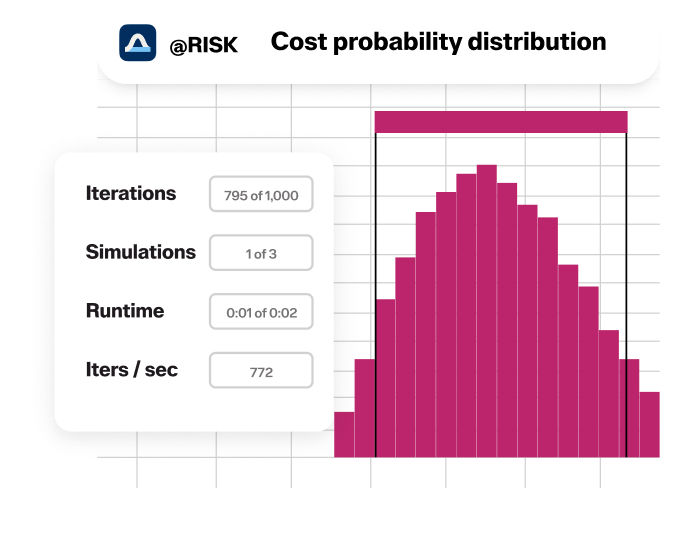
@RISK is a Monte Carlo simulation add-in for Microsoft Excel. It replaces fixed input values in your spreadsheet with probability distributions, runs thousands of simulation iterations, and produces a full probability distribution of outcomes — not a single point estimate.
Every simulation runs directly within your existing Excel model and is fully reproducible and auditable. Risk analysts use @RISK to quantify uncertainty in cost estimates, financial forecasts, project schedules, reserve calculations, and capital investment decisions.
How @RISK compares to AI tools for Monte Carlo analysis
AI tools like ChatGPT, Anthropic’s Claude, and Microsoft Copilot can help explain Monte Carlo concepts, generate simulation code, and summarize outputs. What they cannot do is run a validated, reproducible Monte Carlo simulation inside your Excel model. @RISK performs the computation. AI tools support communication.
Used together — with RISK running the simulation and AI helping interpret and report results —risk analysts move faster without sacrificing rigor. For organizations in regulated industries, @RISK's audit trail and documented methodology are non-negotiable. An AI-generated output has no provenance. A simulation run in @RISK does.


How @RISK runs Monte Carlo simulation in Excel
@RISK extends Excel’s native calculation engine with a validated Monte Carlo simulation framework. You define uncertainty by replacing fixed input values with probability distributions—either selecting the best-fit distribution for your data or using @RISK’s automatic distribution fitting. Then, you run the simulation.
@RISK recalculates your model thousands of times, each iteration drawing a new set of random values from your input distributions. Instead of a single answer, you get a full probability distribution of outcomes—showing not just what could happen, but how likely each outcome is.
Common probability distributions and models

Normal
Or “bell curve.” The user simply defines the mean or expected value and a standard deviation to describe the variation about the mean. Values in the middle near the mean are most likely to occur. It is symmetric and describes many natural phenomena such as people’s heights. Examples of variables described by normal distributions include inflation rates and energy prices.

Lognormal
Values are positively skewed, not symmetric like a normal distribution. It is used to represent values that don’t go below zero but have unlimited positive potential. Examples of variables described by lognormal distributions include real estate property values, stock prices, and oil reserves.

Uniform
All values have an equal chance of occurring, and the user simply defines the minimum and maximum because they have no knowledge of which values are more likely than others. Examples of variables that could be uniformly distributed include manufacturing costs or future sales revenues for a new product.

Triangular
The user defines the minimum, most likely, and maximum values. Values around the most likely value have a higher chance of occurring. Variables that could be described by a triangular distribution include past sales history per unit of time and inventory levels.

PERT
The user defines the minimum, most likely, and maximum values, just like the triangular distribution. Values around the most likely value have a higher chance of occurring. However, values between the most likely and extremes are more likely to occur than the triangular; that is, the extremes are not as emphasized. An example of the use of a PERT distribution is to describe the duration of a task in a project management model.

Discrete
The user defines specific values that may occur and the likelihood of each. An example might be the results of a lawsuit: 20% chance of positive verdict, 30% chance of negative verdict, 40% chance of settlement, and 10% chance of mistrial.
Built for risk analysts who need defensible results.
simulation in Excel

Monte Carlo simulation use cases by industry

Finance and banking
Portfolio optimization, derivatives pricing, credit risk, cash flow analysis, and investment decision modeling under uncertainty.

Energy and utilities
Reserves estimation, capital project risk, commodity price volatility, and integrated energy development cost modeling.

Construction and engineering
Project schedule and cost risk, contingency analysis, earned value forecasting, and infrastructure investment appraisal.

Insurance and reinsurance
Loss reserve estimation, catastrophe modeling, pricing under uncertainty, and capital adequacy analysis.

Manufacturing and supply chain
Supply chain risk, production cost variability, supplier reliability modeling, and inventory optimization under demand uncertainty.

Aerospace and defense
ost, schedule, and reliability risk for mission-critical programs-, from development through lifecycle operations.
Why Monte Carlo simulation is more accurate than single-point estimates

Probabilistic results

Sensitivity analysis

Correlation modeling

Efficient sampling with Latin Hypercube
Run Monte Carlo simulation in @RISK today
Explore more ways to further your Monte Carlo simulation
 Using Monte Carlo Simulation in Excel to Understand Possible Outcomes
 Monte Carlo simulation examples
 How to use AI with Monte Carlo simulation: Practical guide for risk teams
Request demo
See how Monte Carlo simulation helps you quantify uncertainty, assess risk, and make more confident decisions.
Frequently asked questions
No. ChatGPT, Claude, and Microsoft Copilot cannot run a Monte Carlo simulation inside your Excel model. They can explain concepts, generate code, and help interpret results—but they do not provide a validated, reproducible simulation engine.
Running a proper simulation requires calibrated probability distributions, correlation modeling, and an audit trail. @RISK performs the computation directly in Excel, while AI tools support interpretation and reporting.
Monte Carlo simulation software is used to quantify uncertainty in decisions where inputs are variable or unknown. Instead of a single-point estimate, it produces a full probability distribution of outcomes—showing not just what could happen, but how likely each outcome is.
Common applications include capital project cost and schedule risk, financial portfolio analysis, reserves estimation, supply chain disruption modeling, insurance loss reserving, pricing under uncertainty, and regulatory capital modeling.
It is used across finance, energy, construction, insurance, manufacturing, aerospace, and pharmaceuticals—anywhere uncertainty directly affects financial or operational outcomes.
No. AI tools cannot run validated, reproducible Monte Carlo simulations inside Excel models. They can generate code and explain results, but they do not perform simulation calculations.
Running a proper simulation requires a dedicated engine that samples thousands of iterations from calibrated probability distributions, applies correlation structures between inputs, and produces auditable, reproducible results. Standalone AI tools like ChatGPT, Claude, and Microsoft Copilot do not provide this capability.
@RISK does—and runs directly within Excel, so your existing models and workflows remain unchanged.
AI and @RISK are complementary. @RISK handles the computation; AI tools help interpret outputs, draft reports, and communicate results.
Learn more about how to use AI with Monte Carlo simulation >>
The right Monte Carlo simulation tool depends on your workflow and output requirements.
For risk analysts working in Excel—the most common environment across finance, energy, engineering, and insurance—@RISK by Lumivero is the industry standard. It adds a validated Monte Carlo engine directly to Excel, with 40+ probability distributions, automatic distribution fitting, sensitivity analysis, and reproducible outputs that meet audit and regulatory requirements.
For analysts working in Python or R, open-source libraries like NumPy and SciPy can run simulations but require custom coding and do not provide built-in sensitivity analysis or distribution fitting.
For enterprise teams that need centralized risk registers alongside simulation, @RISK integrates with Lumivero’s Predict! platform.
@RISK installs as an Excel add-in, adding a Monte Carlo simulation engine directly to your spreadsheet environment.
You replace fixed input values with probability distributions using @RISK functions, run the simulation, and generate a full probability distribution of output variables alongside sensitivity analysis.
Your existing Excel model remains unchanged—@RISK adds simulation capability on top of it.
@RISK runs 10,000 iterations by default, which is sufficient for most risk analysis applications. This is configurable—you can run fewer iterations for rapid exploration or more for high-precision analysis of complex models.
@RISK also supports Latin Hypercube sampling, which produces accurate results with fewer iterations by sampling more efficiently across the full range of each distribution.

How can we help you? Contact us.