









Key takeaways
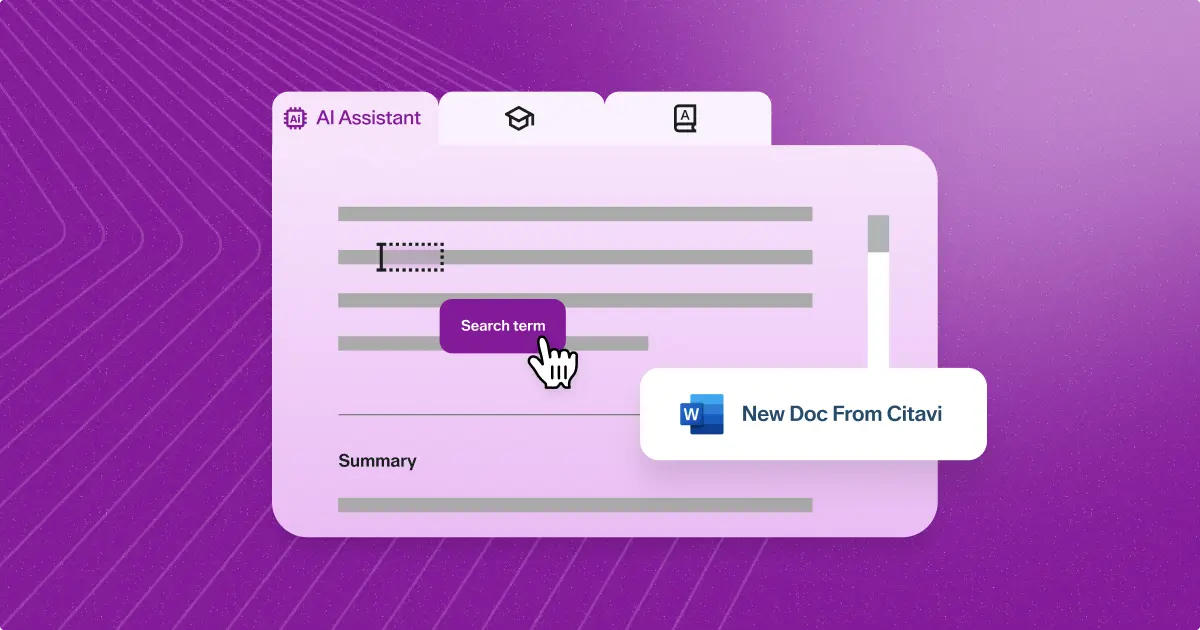
Citavi brings together reference management, knowledge organization, and AI-powered insights in one intelligent workflow—and its AI Assistant can reduce the time you spend on repetitive tasks at every stage. However, AI works best as a thinking partner—not a ghostwriter. The six practices below will help you capitalize on the time-saving features of Citavi’s AI Assistant while keeping your analysis rigorous, your attribution clear, and your scholarship entirely your own.
Citavi is more than a reference manager. It combines reference management, knowledge organization, and AI-powered insights into one intelligent workflow—so from the moment you gather your first source to the final draft, you have everything you need in one place. With the latest release, the AI Assistant takes that further: helping you expand your reference list, quickly evaluate key findings, and expedite your notetaking.
This guide walks through six best practices for getting the most from Citavi’s AI features at every stage of your workflow.
Put Citavi's AI Assistant to work.
Organize sources, extract key findings, and move from notes to draft faster—all in one place.
1: Use Citavi’s AI Assistant as a collaborator, not a crutch
AI tools can accelerate your academic research processes, but they should never replace your judgement. Citavi is designed around this principle. When the AI generates a summary or extracts key findings from an article you’ve selected, it applies a clear “AI:” label directly in the interface. This way, you always know exactly which content was machine-generated.
When using Citavi’s AI citation tool, you should:
- Treat AI outputs as a draft from a research assistant—they’ll still need your expertise
- Edit all notes, insights, and summaries with the “AI:” label freely
- Never copy AI-generated text into your outline without reviewing it
Remember that every AI item can be edited before you save it. The goal is to make AI review feel like a natural step rather than a burden.
2: Build your knowledge base before you let AI work with it
Any AI tool is only as good as the material you feed it. That’s true for Citavi, too. Before you start leaning on AI-powered summaries or extractions of key findings, take the time to build a well-structured project.
- Import your sources
- Highlight important passages
- Save quotations, summaries, comments, and images
Remember, Citavi will automatically link all findings back to their parent references.
Carefully developing your knowledge base means that your AI tool won’t work in isolation. Instead, it will synthesize connected, attributed material—one document at a time. Also, when you move on to the writing stage, every insight will have a clear provenance trail back to the original source. Jumping straight into AI summaries without a good knowledge base is likely to produce orphaned notes—and attribution headaches—later.
3: Read smarter with AI-powered search and summaries
Citavi introduced two AI features designed to work together in the early stages of a literature review. Citavi’s AI search function, powered by Semantic Scholar, lets you find academic papers about your research topic without switching to a separate database. Once you’ve imported candidate sources, the AI Assistant can generate article overviews that include main insights and key takeaways. Plus, you can summarize any paragraph or section with a single click.
AI summaries help you triage your reading list and flag the most relevant sections of each paper. A quick AI overview can be especially helpful with dense or jargon-heavy material—helping you decide whether a paper merits your full attention before you commit the time to reading it.
That said, AI summaries can only capture so much—for any source central to your argument, reading the full text is the only way to catch the nuance and detail that a summary will inevitably leave out.
4: Use Citavi’s outlining tools to transition from summary to synthesis
Your real work as a scholar begins when you move from describing sources to building an argument across them. Citavi’s category and outlining system is designed to streamline this transition.
With Citavi’s outlining tools, you can:
- Drag and drop quotations from multiple sources, including AI-generated findings
- Compare perspectives side by side
- Develop a strong, detailed structure before you start writing
Once you’ve created your scaffold, you’ll need to do the intellectual work of resolving contradictions between sources, identifying gaps in the literature, and deciding which arguments are most compelling. Organizing passages and quotes into Citavi's categories as you read makes building that scaffold more intuitive—so the structure is ready when you are.
5: Verify AI outputs before exporting your citations to Word
Long-time users of Citavi will be familiar with one of its most powerful features: the ability to export your entire outline, with your full bibliography plus citations in any of 11,000+ citation styles, to Microsoft Word. That automation saves time—as long as you ensure there aren’t any errors in your Citavi project first.
When you prepare to export your outline, you’ll have the opportunity to review first. Treat this as a necessary first step, not just a box to check off.
Before exporting your Citavi outline to Word, verify that:
- AI-generated summaries accurately represent their sources
- Key findings are correctly attributed
- No AI-drafted text has crept into your notes without review
Fixing a mistake in Citavi takes seconds. Fixing an error after you’ve submitted your paper is considerably more difficult.
6. Cite your AI use—including outputs from Citavi
Standards for citing AI-generated content are still developing. However, journals, institutions, and publishers all expect transparency. Researchers who use AI assistance in their work need a clear process for attributing those outputs in anything they submit. This includes any outputs from Citavi’s tools.
Fortunately, Citavi’s automatic labeling of AI-generated content ensures you have a built-in audit trail throughout your project. Preserve that label if you move that content into your notes or outlines to remind you of what needs formal attribution when you submit your work.
The APA Style blog offers one framework for citing generative AI outputs. However, many institutions and journals now have their own policies. Verify what that policy is and apply it consistently in your work.
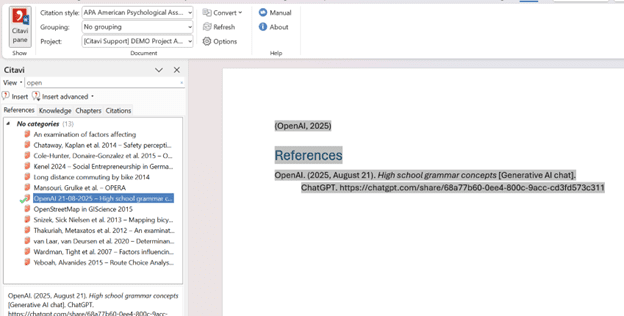
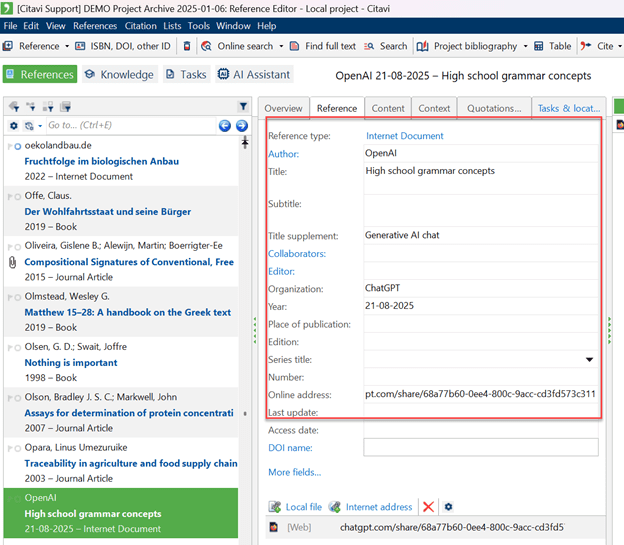
The example below shows how a generative AI output can be cited using APA Style (7th edition) —and how this maps to fields in Citavi.
Example: How to cite a generative AI output in APA Style (7th edition)
Reference list (full citation)
OpenAI. (2025, August 21). High school grammar concepts [Generative AI chat]. ChatGPT. https://chatgpt.com/...
In-text citation (what appears in the paper)
(OpenAI, 2025)
How to enter this in Citavi
- Reference type: Internet document
- Author: OpenAI
- Title: High school grammar concepts
- Title supplement: Generative AI chat
- Organization: ChatGPT
- Year / Date: 2025 (or full date, depending on style)
- Online address: URL to the conversation
Take your research further with Citavi
Citavi's AI tools help you remove friction from the repetitive parts of the research process so you can spend more time on the thinking and argument that only you can do. Use these tools with intention, verify their outputs at every stage, and your workflow will be faster, more organized, and just as rigorous as ever—from first source to final submission.